





The Tesla Holiday Update 2024 brought some of the most anticipated features: Apple Watch support, weather radar, mobile dashcam streaming and SiriusXM. But as with every Tesla-update, this time too there were many hidden functionsthat did not appear in the official release notes.
From smart navigation enhancements about new Easter Eggs up to improved loading indicators - here are the 15 secret featuresthat your Tesla-experience even better!
1️⃣ Weather radar now available for more vehicles 🌧️
Tesla has the Precipitation Map (rain radar) has not been widely advertised, but it is now available for all vehicles with Intel infotainment available. This means that Model 3, Model Y and 2021+ Model S & X can now directly access the current weather situation.
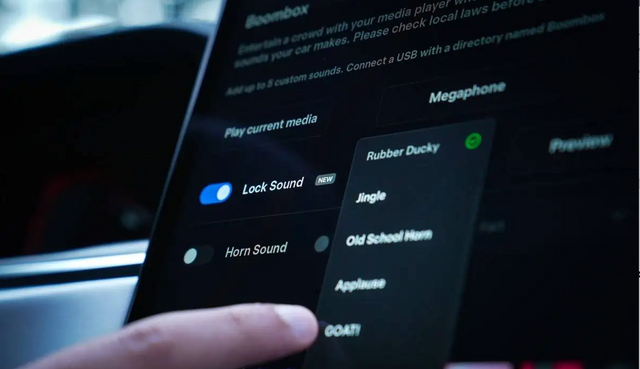
2️⃣ Fart on Sit - the new Tesla-gag 💨
The emission mode has been upgraded: Now your Tesla automatically play a fart soundwhen someone sits down!
💡 Fun Fact: The sound comes from the loudspeaker of the corresponding seat - for an even more realistic experience.
3️⃣ Tesla says "Hello!" - First smart voice assistant 🗣️
Say "Hi" or "Hello" into the voice command buttonand your Tesla responds! This could be a first indication that Tesla's Grok AI will soon be available in vehicles.
4️⃣ Improved voice commands 🎙️
💬 No more acoustic feedback when starting a voice command
💬 When sending SMS, the button sometimes has to be pressed a second time
💬 Smoother voice control for media and navigation inputs
5️⃣ Equalizer reset at the touch of a button 🎵
For those who like to play with the Sound profiles can now play with reset the equalizer to default values at the touch of a button.
🔊 Shortcut: Can be found under Settings > Sound
6️⃣ Better performance for Intel models 🚀
📺 Tesla Theater now runs smoother
🎬 YouTube jerks less
🔄 Minimizing videos is smoother
🎶 Media control now also works with YouTube & web videos
7️⃣ Cybertruck Service Mode - more details ⚡
The new Service Mode Plus for the Cybertruck contains a 3D visualization of all electrical connections. This allows you to find plugs and cables more easily.
8️⃣ Menu optimization for better usability 🏎️
Tesla has the settings menu reorganized:
✔️ Software update menu moved to the top
✔️ Navigation and driving data now closer to WLAN & Bluetooth
✔️ Seats menu now directly accessible
9️⃣ Ambient Lighting Easter Eggs 🌈
💡 New effects for Rainbow Road & Santa Mode
🚗 Rainbow Road: Ambient lighting pulsates in rainbow colors
🎅 Santa Mode: Red, green and white light sequences for a festive atmosphere
🔟 Energy app with new data visualizations ⚡
🔋 Display now over the last 200 miles instead of 5/15/30 miles
🔋 New colors: Green now means "more efficient than EPA value", no longer "recuperation"
🔋 Display of total consumption optimized
1️⃣1️⃣ Supercharger icons revised ⚡
✅ Supercharger icons now oval instead of round
✅ Shows charging power and free stalls more clearly
✅ Third-party providers now more clearly labeled
1️⃣2️⃣ Dashcam playback with variable speed 🎥
🎞️ Dashcam recordings can now be played back at 0.5x, 1x or 2x speed
1️⃣3️⃣ Navigation shows toll roads 🚗
When planning a route Tesla now shows a dollar sign symbol ($) next to the toll routes.
💡 Perfect for finding faster or cheaper alternatives!
1️⃣4️⃣ Restriction of explicit content for YouTube Music 🎶
📌 The "Explicit Content" block now also applies to YouTube Music
📌 Already applies to Apple Music, TIDAL and Apple Podcasts
1️⃣5️⃣ Tire pressure display with new shortcut 🚨
👀 Easy access to the tire pressure:
🔹 Tap on the display to open the detailed view directly instead of jumping to the service menu.
Conclusion: Tesla delivers a huge update - with many small improvements
Besides the major innovations of the Holiday Update, it is precisely these 15 hidden features make the difference. From smarter navigation to fun Easter Eggs – Tesla shows once again why it is a leader in the software integration is.
Have you tried any of the new functions yet?
Keywords
Tesla, Tesla Holiday Update, Tesla hidden functions, Tesla Easter Eggs, Tesla voice control, Tesla navigation, Tesla weather radar, Tesla Dashcam update, Tesla energy app, Tesla Model Y 2025, Tesla Charging Update, Tesla Software update

Hat dir unser Beitrag gefallen?
Wenn du bereits stolzer Tesla-Fahrer bist oder es zeitnah werden solltest, besuche unseren Onlineshop Shop4Tesla und sichere dir 10% Rabatt auf alle Produkte mit dem Rabattcode: NEWS4TESLA. In unserem umfangreichen Sortiment findest du eine Vielzahl an hochwertigen Tesla-Zubehörteilen für jedes Modell. Entdecke spannende Innovationen und Zubehör, die dein Tesla-Erlebnis noch besser machen - www.shop4tesla.com.